We've installed Tesla Powerwalls on our home! Now that we've had them for several months, in this post, we'll explore all the cool things you can do with Powerwalls. Forgive the clickbait headline, but this will be a long post and it will cover a lot! Bookmark it for later reference if you'd like. I should also specify that this is my understanding of how things work. I'm not an electrician, all of this data should be double-checked with your installer.
Let's start with the basics. Powerwalls are rechargeable batteries made by Tesla for residential home use. They can be charged by solar (if you have it) or by the grid. They can be used to provide power during a blackout and/or to time-shift your grid energy use.
We're primarily using them to time-shift our energy usage. I find this fascinating, sunlight that hits our roof at noon now powers our lights at 6PM. We've had solar since 2007, the panels allowed us to be solar-powered when the sun was shining (but only when the sun was shining). Now, however, with Powerwalls, we control when we're solar-powered. Put simply, we're able to store sunlight in a box 😁
*The engineering part of my brain hates over-simplifications like that. The sunlight is not literally stored. The PV generates electricity and the electricity causes an electrochemical reaction within the battery known as recharging and we can use software to manage battery discharge. However, I have to admit that "Sunlight in a Box" is a simpler (and much more fun) message.
Looking at this energy source and receiver list, you'll see that Powerwalls and the grid can be either an energy source or an energy receiver. This gives the gateway the ability to use them for either purpose depending on the moment's energy need and the system settings (much more on this later). The Energy Gateway is the conductor of this energy orchestra. It coordinates the various energy sources and receivers based on many factors including your preferences, the battery charge state, the cost of grid energy... We'll cover this more in the next section, Modes, below.
Here's a fun example. The solar panels are powering our home, feeding the grid, and charging the Powerwalls (a little). This was occurring at 9:30 AM on a winter morning.
Modes (Self-powered, Cost Savings...)
Our primary Powerwall use case is time-shifting solar energy use from mid-peak times to peak times. This will reduce stress on the grid, while reducing our electricity bill. However, this is just one of the use cases that the Tesla app supports, let's go through all 3 (or 4) of them.
1: Backup Only
This one is very straightforward. The batteries charge up to 100% and stay at 90% plus, ready to power your home during a power outage. If you have solar, that's used to charge up the batteries; otherwise, they'll charge from the grid. If the system detects that the state of charge of the cells in the pack are unbalanced, it may cycle the battery by discharging below 20% and then recharging. This should be a very rare event, but if you see it happening, now you know the reason.
2: Self-Powered
The goal of this mode is to minimize grid power usage. Your home is powered with solar whenever possible. Surplus solar is used to charge the batteries. If (and only if) the batteries are full, then surplus solar is sent to the grid.
Similarly, when there is not enough solar to power the home, the batteries are discharged. If the batteries are fully discharged (down to an outage reserve level that you can set anywhere from 10% to 100%), only then does the system draw power from the grid.
The simple explanation for this mode is "use the grid only as a last resort."
3: Advanced
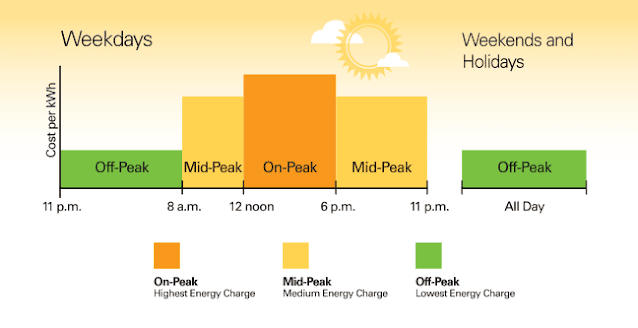
This is where things get interesting. Under Advanced, there are two options: Balanced and Cost Savings. Both of these modes consider the price of electricity from your utility and how the price changes throughout the day. This is called time-of-use (TOU). Many utilities have a time-of-use fee structure with prices that vary throughout the day as well as on weekends and holidays. Additionally, there may be seasonal considerations. Below is an example from my local utility, Portland General Electric.
Time of Use
For some utilities, TOU is all that they offer. Others have flat-rate or TOU fee schedules and you can select which program you'd like to be on. My utility defaults to a flat rate. Every kWh costs the same (with some usage tiers) no matter what time of day you consume it. However, they also offer a TOU plan that you can opt into. The rule of thumb is that if you can move half or more of your electricity use to off-peak, then the TOU plan will likely save you money. For us, we have two EVs that charge up overnight. Then we have the solar panels that reduce our daytime grid demand, so
TOU was worth it. Now with the Powerwalls, we'll be able to take weekend and mid-day sunshine and feed that into the grid during peak hours. This will further increase the savings that time of use offers us. After we have a few months of bills, I'll post a Powerwall savings blog entry.
Sunday's sunshine will power our home on Monday morning during peak price hours before the sun comes up. As you can see in the footnotes of the image above, Saturday has no peak hours and all-day Sunday is considered off-peak, making this the prime time to charge the Powerwalls to 100%.
For Portland General customers on TOU, some holidays are off-peak all day. Some holidays? Here's the list: New Year’s Day, Memorial Day, Independence Day, Labor Day, Thanksgiving, and Christmas.
Let's look at a simple example of load shifting.
The above graph is from the Tesla app. It shows that from 8AM till 4PM we were generating solar electricity. This was a cloudy January day, so we didn't make much and you can see there was a short break in the clouds around 2PM where production spiked. Without Powerwalls, this energy would have been used to run our home or been feed into the grid for net-metering. Instead, this all went into the Powerwall (green below the line is charging). Then at 5PM, after the sun had set, Peak time started. This is when electricity is at its highest cost of the day. So, instead of using grid power, the Powerwalls were discharged to power our home for 3 hours, eliminating our evening peak load from the grid.
I have a 50% reserve setup, so if solar production is low for a given day, the Powerwall will stop discharging (even during Peak) when it gets to 50%. This way we always have at least a 50% charge if there's an unexpected power outage.
Let's look at another, more interesting example of load shifting.
You can see that we have two peak times. During the AM peak, the green above the line shows that our home was powered by the Powerwalls until the sun came up. When the peak ended, the Powerwalls went into recharge mode, as you can see from the green below the line. Around 3 PM the Powerwalls were full. Then we hit the PM peak time. From 5PM till 8PM our home was once again battery-powered. These are peak demand times and we are using zero energy from the grid. This saves us money and reduces grid peak demand.
Setting TOU Hours
The app interface to set the TOU schedule (below) is pretty straightforward. You grab and slide to set peak and off-peak. Anytime leftover is considered shoulder.

Now that we've gone through TOU meanings and setup, we can finally get to the two Advanced Modes that depend on TOU.
3a: Advanced (Cost Savings)
This is the mode we use. The utility sets the prices highest when they have the most anticipated demand. So by trying to reduce our bill, we also reduce stress on the grid. Removing our peak load means that it is a little less likely that the utility will have to spin-up the peak load power generation. This is when they must use 'peakers' to keep the grid operational. Peakers are often the dirtiest sources of electricity on the grid. They can be diesel generators or quick-fire natural gas plants that run at much lower (less efficient) temperatures than their high-efficient high-temp fellows.
3b: Advanced (Balanced)
Balance sounds nice. Who doesn't want balance? This mode attempts to reduce peak energy use and provide more self-power than the Cost Savings mode. This mode uses Tesla's Energy Forecasting to estimate future production, if it determines that you are likely to generate enough to cover the next peak event, then it will allow the battery to continue to discharge down to your reserve or the calculated value (whichever is higher). This increases your self-powered score and probably won't cost you much if any.
In my tests with this mode, I found it often discharging the battery during the evening in off-peak hours. However, I'd prefer that it save that energy for our morning peak hours. However, the Tesla app only allows you to set one peak time (not two like our utility uses in the winter). So, until the app allows for more configuration, the Powerwall system does not have all the information that it needs to best orchestrate the energy flows and I'm going to avoid this option for now.
Picking A Powerwall Mode:
Backup Only, Self-Powered, Cost Savings, or Balanced

In the above image, it is peak time and the system is in Cost Savings mode. This means the batteries are being used to power the house and, as you can see, the solar power is currently flowing into the grid to offset our prior grid usage. This often brings up the question, can you get paid for supplying energy to the grid, so I'll cover that in the next section, but now let's finish looking at considerations for picking the mode that's best depending on your needs.
For us, having Powerwalls as backup power is a nice bonus, but not our primary reason for having Powerwalls. We'll keep something like 30% to 60% in reserve for black-out protection, but we want the batteries to actively participate in our home energy system, so we won't be in Backup Mode.
Self-powered is a good goal, but this mode does not comprehend the TOU rate variations and so is not the mode that we'll be using. If you are not on a TOU program, this might be a good choice.
Advanced: If you are on a TOU plan, this is the mode you likely want to use. Either of these (Cost Savings or Balanced) are good options and most of the time they will yield very similar results. The only difference might be some grid feed-in occurring in Cost Savings mode vs a similar number of kWh going directly to the house in Balanced Mode. The differences between these modes would be based primarily on the forecast by Tesla for your energy use and energy production.
The only reason that I hesitate to use Balanced Mode is that in the winter, we have two peak times and the app currently only supports one peak time. So I don't want the battery to continue to drain in the evening after the peak time has passed. I would rather use that energy the next morning during the morning peak before the sun has come up (even if that means I need to move the peak around manually in the app occasionally or use smart home automation - more on that below). Maybe I'll try balanced in the summer when we only have one peak time and lots of sunshine. So our selection for the best mode is Cost Savings.
Can You Get Paid For Supplying Energy To The Grid?
Maybe. This is highly dependent on your local utility. There are about 200 major utilities and more than 3000 in total in just the US. I'm not going to cover each of these, but I will tell you what to look for on your utility's website. There are two general feed-in recognition schemes: One, Renewable Feed-in Tariffs and two (the far more common) Net Metering. With a feed-in tariff, you can actually get paid. With net metering, you can reduce your bill. Let's look at each of these a little more.
Renewable Feed-in Tariffs
These programs pay you when you send renewable energy to the grid. They can even pay you more than the market rate for energy. The idea is that for the utility to generate renewable energy, it would have had to spend millions on a renewable plant and even more for on-going staffing and maintenance. Rather than spending this money to build and run their own plant, that same money goes to encourage homeowners and business owners to install renewables and feed their surplus into the grid.
The only drawback to these programs is that they are limited and infrequently offered. There's a fixed budget for these programs and they tend to go quickly. The last time that I could find this offered from Portland General was 2013, so it's not likely that there will be another one offered around here anytime soon.
One aside (because that's what we do here). It's called a "Renewable Feed-in Tariff." When I see the word tariff, I think of a tax or an import duty. I think of it as something that I have to pay. Well in this case it's the utility that is paying and you are the one getting paid.
Net Metering
If you are not among the lucky few that got into a feed-in tariff plan or VPP, net metering is your next best option. This is a relatively simple scheme. When you are using electricity your meter is "spinning" forward. With net metering, when you are feeding the grid, you are spinning the meter backward. You are then billed for the final reading on the meter (the net of spinning forward part of the time and backward part of the time). However, if the meter result is negative (meaning you feed in more than you used), you receive a zero kWh bill and this extra is carried forward to the next month. Feeding in more than you use is also referred to as "banking kilowatt-hours" because they are saved for later months (like winter) when you may not generate more than you use.
This carry-forward or banking is nice so that summer months can build up credits to be used in the winter. Here, in Oregon, the net metering "year" starts in April. Starting the spring is the best way to make sure all the banked credits have a chance to be used. If you still have credits leftover when the year ends, these are donated to the utility's low-income program.
TOU can add an extra layer of complexity to this. Each TOU zone (peak, mid-peak, off-peak) has its own mini net metering within that zone. For each bill, any surplus within a given zone drops to the next zone down. Check with your utility to see how they handle this case.
Virtual Power Plants (VPP)
VPP: One more way you might get paid for owning Powerwalls. Some utilities are implementing virtual power plants (VPP). If you have Powerwalls and you join a VPP, the utility has the ability to charge/discharge your battery as the grid needs fluctuate. To compensate you for the extra wear and tear on your equipment, the utility will pay you or provide you the Powerwall at a discount (or even free). Participation payments may be a flat monthly rate (like PGE Smart Battery Program) or by kWh.
How Powerwalls Made Our Solar Worth 75% More
First, I have to say thanks for reading this far (or skipping to here, that's okay too). This has been a long one. Now that we've covered TOU and time-shifting with the Powerwalls, we can look at how this impacts our electricity bill.
Here are our TOU rates:
| TOU Zone |
Price per kWh |
| Peak |
12.38¢ |
| Mid-peak |
7.051¢ |
| Off-peak |
4.128¢ |
|
Most of our solar production occurs during Mid-peak. That means that each solar kWh that we generate was offsetting 7¢ mid-peak energy from the utility. However, now, instead of using that solar energy immediately when it is generated, it gets stored in the Powerwall. Then it gets used during peak time. That makes our solar is worth 12.4¢ per kWh instead of 7¢. That's 75% more.
Time-shifting with Powerwalls made our solar panels worth 75% more. This time-shifting will mean that our peak usage will be zero on days with even a moderate amount of sunshine. This could make TOU an option for homes where it was otherwise not a good choice.
Here Sunday is off-peak all day. This allows us to fully charge the battery for use throughout the rest of the week. So on Monday, during the morning peak, we've using energy that would have been offsetting 4¢, to offset 12¢ power. In that case, the Powerwalls are tripling the value of our solar energy.
The extra cost savings is nice. It won't pay for the Powerwalls by any means, but cost savings was not the reason that we purchased these (it's just a nice side benefit).
Powerwalls: Do They Have To Be Inside?
Powerwalls can be installed inside or outside, but there are considerations. Lithium batteries have a preferred operating temperature range. Luckily, Tesla is well aware of this from their other battery-powered products (cars) and Powerwalls have a thermal management system built-in. They can operate in temperatures from -4°F to 122°F. However, at extreme temperatures, the Powerwall may limit charge or discharge rate to improve its lifespan. If you are in an area that is often outside of the 32°F to 86°F range, Tesla recommends that Powerwalls are installed indoors. In extreme temperatures, the thermal management system runs to maintain the batteries, this effectively reduces the energy-in to energy-out efficiency of the system.
Here are some other considerations that Tesla recommends: For best performance, avoid installing Powerwall in locations exposed to direct sunlight. Humidity and rain do not pose a risk, Powerwall should not be installed in locations subject to flooding or near water sources such as downspouts, faucets, or sprinkler systems. In order to maintain proper ventilation, Powerwall should be kept clear of debris such as leaves, dense brush, and areas that accumulate snow.
How Can Powerwalls Be Mounted?
When you have multiple Powerwalls they can be mounted side-by-side on a wall or floor or stacked front-to-back on the floor.
Side-by-Side Mounting
When mounted side-by-side, each Powerwall must have enough clearance on the sides for electrical connections and proper ventilation. As you can see in Eric's install above, the Powerwalls have space between them.
 |
4 Powerwalls Mounted 2x2
Two Front-to-Back and Side-by-Side
via Revision Energy |
Front-to-Back Mounting
When stacked front-to-back, up to three Powerwalls can be grouped together. For this stacked method, the Powerwalls are floor-mounted or concrete pad mounted and anchored to the wall. Stacks cannot be hung on the wall. The stacked Powerwalls are joined together with special hardware. This method may use fewer conduits in some installations.
How Loud Are They?
Noise production: up to 40 dBA (quieter than most refrigerators)
Powerwalls do make some noise. They have fans and pumps that are used as part of the internal temperature control system. They are not that loud, but you should consider this when you are selecting the mounting location. You would not want Powerwalls mounted near a bedroom window, for example.
How Big Are Powerwall 2s?
L x W x D
45.3" x 29.6" x 5.75"
1150 mm x 753 mm x 147 mm
How Much Do They Weigh?
251.3 lbs / 114 kg (current)
When initially introduced the weight was 269 lbs / 122 kg.
What Color Are They?
There are two color options: white or red. White ones are the standard units. Red ones are the signature units and supposedly only available via the referral program. However, I have heard of cases where contractors have had several red units available. Additionally, many people that earned a Powerwall via the referral program were not in a position to install it, so they occasionally appear on eBay and the like.
Are Signature Powerwalls Actually Signed?
Powerwalls that were earned via the referral program and delivered in 2018 or earlier were signed by Elon Musk, JB Straubel, & Franz von Holzhausen. However, now, despite the name, the signature units currently being delivered are no longer actually signed 😢
Powerwall 1 vs Powerall 2
The Powerwall 1 was released in 2015. Tesla quickly followed this with, the current version, Powerwall 2. This second version made several improvements. It has more than twice the storage capacity packed into a smaller space and it has triple the power output over Powerwall 1. Powerwall 2 has a more robust cell chemistry and, unlike its predecessor, uses the same cell type for both systems intended for backup only purposes as well as for daily use time-shifting systems.
The only thing Powerwall 1 had that might be considered better than 2 is a stylish curved cover, reminiscent of the car. It looked really cool but didn't allow the units to be stacked.
What Battery Chemistry Does Powerwall 2 Use?
Or: Does the Powerwall Use the Same Batteries as Tesla's Cars?
Tesla uses a variety of battery cell chemistries including Nickel Manganese Cobalt (NMC), Nickel Cobalt Aluminum (NCA), and Lithium Iron Phosphate (LiFePO 4 battery) aka LFP battery (Lithium Ferrophosphate).
Tesla's vehicles are far more demanding on batteries than are Powerwalls. With Powerwall, they don't have to accelerate from zero to 60 in 2.3 seconds. They don't have to absorb massive regen one moment and then discharge the next. The flow of energy into and out of Powerwalls is controlled and limited. Additionally, Powerwalls also don't have to be carried around, so the energy to weight ratio (aka gravimetric energy density) is far less important than it is for a vehicle battery pack.
All this is to say that any of the chemistries that would work in a car, would easily work in a Powerwall. LFP would likely be the best candidate, if for no other reason than they tend to be the cheapest. LFP is also more tolerant to sitting at a high state of charge without impacting the lifespan of the battery.
While trying to find out which cell chemistry is used in Powerwall 2 packs, I found conflicting information. I could not find an official statement from Tesla naming the specific chemistry. Some sites said that they were using NMC (Nickel Manganese Cobalt) cells and other sites said they were using LFP (Lithium Ferrophosphate). It's possible that both are correct and that Tesla has been utilizing each cell chemistry at various times. They certainly would have battery management systems available for each. However, LFP generally does not have as high of a peak power output as NMC. The 7kW peak power output (~50% C rate) is well within LFP's capability. So, it could be either, but more sources indicated that NMC was Tesla's chemistry of choice in Powerwalls. If Tesla used NMC in some and LFP in others, there would be a weight difference and I think they would need to list the two weight options, which I have not seen, so I assume that they are using NMC and only NMC (for now).
Since we're talking about cell chemistries, it's important to discuss Cobalt.
Cobalt is a conflict mineral and it's expensive. These two factors are compelling many cell manufacturers, including Tesla, to develop methods to reduce or eliminate Cobalt from their cells. LFP, for example, is Cobalt-free and the energy density has been increasing with each year as battery tech continues to advance. In 2020, CATL announced a cobalt-free battery for use in EVs. These would not be for 300 mile+ range vehicles, but these are great for more affordable EVs and perfect for Powerwalls.
Can I Buy Powerwalls for my Existing Solar?
On April 24th, 2021 Tesla updated their policy to sell Solar and Powerwall as a bundled package and only as a bundled package. This was a big change from their previous policy. There was a large demand from people with existing solar PV systems to add Powerwalls. After the power outages that much of the US experienced in February of this year, many people (with or without solar) ordered Powerwalls.
This demand put Tesla in a pickle, they had customers installing solar (panels or glass roof) that wanted Powerwalls as well. They were supply-constrained and made the choice to favor their solar customers, rather than other potential customers. This is the most effective use of their limited supply. The Tesla crew is already there installing the solar system, rather than scheduling a job just for the Powerwalls. I suspect, as their supply increases, Powerwall sales may open up again, but I wouldn't count on it since batteries will be in constraint for several years as Tesla continues to sell more vehicles.
There are some 3rd party installers that have a small supply of Powerwalls, if you are lucky enough to find one of them, you may be able to have Powerwalls installed on an existing system.
Other Fun Stuff (Storm Watch and EV Charging)
Storm Watch
Storm Watch is a great feature of Tesla Powerwalls. Since Powerwalls are internet-connected devices, they will receive a signal when an outage is likely in your area, then the Powerwalls will top up to be fully ready to power your home if there's a blackout in your area. This is the only time (if you have solar) that Powerwalls are allowed to recharge from grid energy.
The cool thing about this feature is that it is not just used for storms. Perhaps this mode should be called "Disaster Watch" since storms are just one of the disasters that cause them to charge up. Tesla has access to alert forecasts from the National Weather Service; these alerts cover severe winter weather, flooding, thunderstorms, tornados, hurricanes, fires, tsunamis, drought, general emergency alerts... This means, even if you miss the news, your Powerwall is watching out for you (if you enable this feature).
EV Charging
Tesla's cars have big batteries and long-range. The two Tesla EVs in our garage are the equivalent to about 12 Powerwalls. That means, if they were to start charging during a power outage, the cars could quickly drain our 3 Powerwalls, leaving us with no energy for our home during an outage. Knowing that Tesla Powerwall owners are likely to be Tesla vehicle owners, Tesla thought of this situation and gave you a way to manage it as you'd like.
The great thing about having the cars and Powerwalls in the same connected ecosystem is that they can work together. If there's a power outage, you can control whether or not the car will charge based on how charged up the Powerwalls are. Additionally, when the car is charging from the Powerwall, the power level that the car requests is adjusted to allow for load sharing with the house. You would not want the Powerwall to shut down because the load had exceeded the maximum that it can supply (5kW continuous, 7kW bursts per Powerwall).
The "Vehicle Charging During Power Outage" setting allows the car to charge when the Powerwalls are near full. This has an advantage that might not be obvious at first glance. If the Powerwalls are approaching full, charging the electric cars makes room in the Powerwall for more solar to be stored and, if we need to leave, our cars will be charged up.
Additionally, if we really needed to, we could power some of our needs from our cars with an
inverter plugged into the 12V outlet.
Solar Gateway
There's supporting hardware that comes with your Powerwall. One of these extra items is a data gateway called "Solar Gateway". This is data gateway connects your Powerwall system to the internet. This is how your Tesla app connects to your Powerwall system. This allows you to set the Powerwall mode and see the current state. The data gateway also collects all the energy telemetry streamed from your Home Energy Gateway and sends it to Tesla's servers. From there, your Tesla app can access that data in beautiful multicolor graphs.
How Many Powerwalls Do I Need?
There are at least a couple of ways that you could determine how many Powerwalls you should get. The first, and simpler method, is (assuming you have solar) to divide the size of your PV system in kW by 5 and round up. For example, if you have a 6kW system, you'll need 2 Powerwalls; if you have a 14kW PV system, you'll need 3 Powerwalls. This method ensures that your Powerwalls will be able to absorb all the electrons your PV system excites during peak output.
The second method is a little more complicated. This method asks the question, how long do you want the Powerwalls to last when the grid is down. To answer this, the first question is do you want to back up your whole house or just the essentials? This will greatly impact the number of Powerwalls that you need. As you can see in the image below, there are options. You can back up everything or just your refrigerators and furnace. Running your entire home will obviously require more Powerwalls than just running the essentials. If you want to keep an AC unit running for hours, you'll likely need 3+ units. If you have a small home and/or consistent solar production, one Powerwall might be enough. Tesla has a design guide that will help you determine how many you should have.


The next question is "do you have solar?" With solar panels, you have energy coming into the system, even during an outage. That helps keep the lights on. However, here in northern Oregon, our wintertime solar production is generally low. We are most likely to have a power outage during a snow or rain and wind storm, this is also when solar production would be at its lowest. So, we'll need a few more kWhs of storage for the winter months.
Understand Your Energy Use
To determine how many Powerwalls you need, you'll need to understand a little bit about your energy usage.
Seasonal Considerations
Take a look at your electric bill and see how many kilowatt-hours you use on a typical day. If possible, check your electricity bills from different seasons. Do you have an AC unit that runs full blast all summer, do you have electric heating that runs all winter? Take the worst one and then determine how many days of backup energy you'd like to have. For us, our worst grid energy use month is January because that's when solar production is at its lowest. We run the AC frequently in July through September, but the solar production during this time more than compensates for this extra energy use.
Taking our worst month (Jan) we use about 50kWh per day. Our 3 Powerwalls only have ~40kWh, so these 3 would last less than a day if we had a blackout, no solar production, and continued to use electricity at our normal rate. However, we can relatively easily cut our daily energy use down to ~15 kWh per day for a short duration. This would allow us to stretch the Powerwall out for nearly 3 days. We'd likely have some solar production over a 3 day period too, stretching our blackout tolerance period even further.
We were able to test these assumptions in February when we (and much of the US)
lost power temporarily due to an arctic blast.
How To Stretch The Powerwall Duration
If you want to make your Powerwall last as long as possible during a power outage, you need to do more than just turn things off. Many devices have standby energy draws even when they are turned off, this is called a
Vampire Draw. To avoid these vampires, you can unplug the device or, even better, turn off the circuit breaker they are on. Printers, computers, TV, and many appliances continue to draw power even if they appear to be off.
Try a dry-run: If possible, it might be nice to spend some time at your breaker box and get to know which items are on which circuits. Make a list of essentials and a list of the circuits that you can turn off during an outage without having the food in your frig spoil or your home temperature becoming unbearable. If you can do this dry run, when you are in 'essentials only' mode, go to your meter and see what your energy usage looks like. Make sure to monitor it for a few minutes since a frig compressor or the like might cycle on or off after a minute or two.
One Powerwall?
Even just a single Powerwall is very useful. If you have solar, the Powerwall allows the solar to stay operational during an outage. If you have a gas furnace, a single Powerwall allows the fans to run and for the furnace to heat your home. It can back up your refrigerator (especially an energy-efficient one) and keep your food from going bad. However, a single Powerwall is only 13.5 kWh of energy. That's just over a dollar's worth of electricity here. You can't expect it to run your home for days.
With just one Powerwall, the system is limited to 5 kW of sustained output (with spikes of 7 kW allowed for up to 10 seconds). This means that you'll likely have to add an inrush current limiter or "slow start" unit to your air conditioner or any water pumps. During the first few seconds of their start-up, AC units and other large motors draw a significant amount of power. This can exceed the power that a single Powerwall can supply, but a slow start unit can allow the motor to spread that load out allow it to be started without exceeding what a single Powerwall can provide.
Although even just a single Powerwall is very useful, it has a rather limited amount of storage, so I would only recommend one Powerwall if you have a small energy-efficient home or if that's all you can afford. If you're considering more than one Powerwall, check out the next section.
More Than One Powerwall?
You can have up to 10 Powerwalls in a standard residential installation. Additional equipment may be required for more than 6 units. Each Powerwall adds another 13.5 kWh of usable energy and it adds another 5 kW of power to the sustained output. This additional power output likely means that with 3 plus units you won't need a slow start device on AC units and the additional energy means that you'll be able to keep the lights on longer.
We opted for three Powerwalls. This is a sweet spot for functionality and cost, IMHO. Although, now that I have them installed, I think I'd order 5 or 6 if I were ordering it now. Just as buying an EV, you never regret having more capacity. With 5 or 6 Powerwalls, I could leave the equivalent of 3 fully charged and then have the other 2 or in play for daily time-shifting of grid demand energy use.
How Long Will Powerwalls Power My House?
I don't know, I've never been to your house☺But seriously, there are many considerations. What's your home energy use, do you have solar, what's the production, will the Powerwalls need to heat or cool themselves?...
The analysis above for "How Many Powerwalls Do I Need?" walks you through how to determine this.
Is There Energy Loss? or What's the Round Trip Efficiency?
All systems have some energy loss. As we discussed in the AC/DC section above, the energy that flows in and out of the Powerwall has to be converted. These conversions have some loss. The round trip efficiency is 90%.
The Powerwalls additionally have to maintain their internal temperature control, this too uses energy in extreme weather conditions (especially in outdoor installations).
Where Can I Order Powerwalls?
From
Tesla! Tesla can install them or work with a certified contractor to have them installed. Many local solar installers also can install energy storage systems from Tesla or others.
How long is a Tesla Powerwall lifespan?
Tesla guarantees that each Powerwall will retain 80% of its capacity over 10 years. That means, after 10 years, you can expect at least 10.8 kWh of storage per unit.
Power and Energy Explained (kWh vs kW)
There are two important items in the specs that you should understand. Energy and Power.
Energy is the capacity of the unit. Using a fluid analogy, think of this as the volume (liters, gallons) that it can hold. Energy is measured in kilowatt-hours (kWs).
Power is the rate at which energy is moved into or out of the unit. Continuing the fluid analogy, think of this as the flow rate that the bucket is being drained (or filled). Power is measured in kilowatts (kW).
If you had a full 1 kWh battery and you were able to drain it at a consistent rate of 1 kW, it would take 1 hour to drain the battery completely.
Power and Energy Specifications
Each Powerwall 2 has a usable capacity of 13.5 kWh of capacity. For home use, you can gang up to 10 of them together for 135 kWh.
Powerwall 2 has a sustained recharge/discharge rate of 5kW and a peak rate of 7kW that can be used for up to 10 seconds. This peak rate is often needed when starting an electric motor such as an AC unit or heat pump. Just as with the energy capacity, this power level is also additive. With 10 units you'd be able to support a sustained 50kW load with spikes up to 70kW.
UPDATE (April 21st, 2021): Elon Musk tweeted today that based on data that Tesla has collected, the Power rating of Powerwall 2 will be increased by up to 50% in ambient temperatures. A firmware update will be coming to all Powerwall 2s with these new specifications and we'll know more soon. This is the great thing about having an internet-connected system.
How long does it take to charge a Tesla Powerwall?
Powerwalls have 13.5 kWhs of storage and they can charge (or discharge) at a rate of 5kW. That means they can be charged from empty to full in about 3 hours assuming full power is provided. If they are being charged from solar, it depends on the day's weather and the capacity of your PV system.
When Storm Mode is activated, the Powerwalls charge from the grid. When our system charged up during the
Valentine's Day outage, our 3 Powerwalls charged at 10 kW. That's only 2/3rds of the sustained maximum. At that rate, it would take just over 4 hours to charge up to full.
Can I use a Tesla Powerwall to go off-grid?
The short answer is: yes, you can. The long answer is: It depends. Some states require you to be grid-connected if electric service is available in your area. Even if you have enough solar and storage, to be off-grid, these states might require you to attach.
Another consideration is cost. Depending on your energy needs, you may need a significant number of Powerwalls. Staying connected to the grid allows you to use the grid effectively as additional energy storage via net metering or as a supplemental supply during low solar production months.
Can I use a Tesla Powerwall without solar?
Yes, you can!* Powerwalls can be used without solar. They can be used either for backup or for timeshifting energy use. Without solar, you'd need significantly more kWh (more Powerwalls) to have a significant backup duration.
* If allowed by local state/regional laws.
Currently, Tesla is only selling Powerwall 2s when they are bundled with solar. Some authorized independent contractors may still have Powerwalls in stock, so it is possible to have them installed even if you don't have solar. By the time you are reading this, Tesla may have relaxed their policy and may allow sales without solar, so it's best to check on that directly.
Can I use a Powerwall with a Generator?
Yes, you can have a backup for your backup.
Powerwall 2 can be added to a system with a backup generator connected with an external Automatic Transfer Switch (ATS) or a Manual Transfer Switch (MTS). If you have an MTS, you must (as the name implies) manually flip the switch to power your home from the generator. Note that Powerwalls should not be charged from a generator.
In an outage, Powerwall responds immediately and provides backup power before the generator can detect the outage. The generator should be turned on only after the Powerwall has a low charge, or if loads exceed Powerwall's maximum output.
When grid power returns, the generator should be turned off and Powerwall can resume normal operation (charging from solar or the grid).
Can I Access My Powerwalls If My Internet Is Down?
Yes, you can. You don't have as much control as you do with the app, but you can access the Tesla Energy Gateway (TEG) via your home intranet. Just follow
these steps to connect the TEG to your local WiFi and you can access it locally to see what's going on.
 |
Local Network Access Screen
|
Can I use a Powerwall with Residential Wind or Hydro?
No.
As I write this, Tesla's FAQ says, "Powerwall does not currently work with existing battery systems or other (non-solar) renewable energy sources, such as wind or hydro."
I assume that Tesla is not supporting this because they are smaller markets than solar. As AC-connected batteries, as long as the power rating is observed, the system should have broad compatibility; but if it's not supported by Tesla, you could void your warranty if you use it this way.
During an outage, Powerwall 2 does some smart things with the electrical frequency to ensure that solar production does not exceed the battery's storage capacity. If your wind or hydro inverter didn't respond to these frequency changes in the same way that solar inverters respond, this could create a hazardous situation, so I would not recommend it unless Tesla announces explicit support for specific inverters at some future date.
Will There Be a Tesla Powerwall 3?
Tesla has not announced any plans for a Powerwall 3 AFAIK. Battery technology is advancing quickly, and Tesla iterates quickly so I wouldn't be surprised if a new version were announced. Stationary storage is not as demanding, as automotive so this product could have a longer revision lifecycle.
Powerwall+
I have been working on this article for days, and now, just hours before this was to be published, there's a leak about a "Powerwall+". To be clear, this is just a leak/rumor and little is known about it as I write this, so take a full grain of salt with this section. Here's the leaked document:
As you may know, Tesla recently started making their own inverters and they make the energy gateway. Additionally, Tesla recently announced that all solar installations would include at least one Powerwall. One of the stated reasons was that this would ease installation. Taking all of this into account, this leak makes sense. Rather than installing a separate Energy Gateway and inverter, combine them into one unit (which they can do now since they make both) and simplify the installation.
More recently, due to a significant increase in demand after the massive Texas outage, Tesla has temporarily restricted sales to solar installations only. It is too bad that they are supply-constrained. However, given this constraint, it makes sense to prioritize solar installations. Powerwalls can be used without solar, but 'with solar' is where they really shine and they would not want to delay a solar installation because Powerwalls were not available.
Depending on where you live, there could be state, federal, and/or utility incentives that apply to Powerwalls. As I write this, there are many discussions about new green initiatives happening in DC, so there may be new, more generous, incentives coming soon. Some of the solar incentives also apply to energy storage systems like Powerwall when they are installed as part of the solar PV system so make sure to look in the solar incentives for energy storage incentives too. Here are a few links to check out to see if the incentives could apply to you.
The federal incentive is up to 26% of the cost. The Oregon incentive is a little more complicated. Here are the residential rules:
Home Automation
If you love the tech and you have Powerwalls, you might want to add them to your home automation. One of the cool things about having a Tesla product is that there's a community that's passionate about these products and making cool toys and accessories for them.
Here are a few home automation options to enhance your Powerwall ownership:
Tesla's app has relatively good control options for the Powerwalls, but it is missing a few things (see suggestions in the next section). If you'd rather now wait around for app updates, you can control the system yourself. You can add custom schedules for changing modes (Backup-Only, Self-Powered, Advanced Balanced, or Advanced Cost Savings). You can also adjust the reserve level throughout the day as you see fit. One final cool thing you can do with this is to shut off other smart devices in your home if the Powerwall detects a power outage.
You can query the status of the Powerwall and write code or scripts to respond to changes in the Powerwall or the grid. You can monitor things including State-of-charge, current load, frequency, solar power level, and more.
Collect, analyze, and display data from your Powerwall in a dashboard view. You can track your energy costs and savings and watch your Powerwall state-of-charge throughout the day.
Use a Rasberry Pi to control programable LED strips based on the status of your solar and Powerwalls. Have a bar of green LEDs to show your Powerwall charge/discharge power level, a yellow bar to show your solar production, a blue bar to show your home load, white to show how much you are feeding to/from the grid. How you configure it is up to you!
If you've found others (or made your own), leave a link in the comments.
App Improvement Suggestions
The Tesla app is great. I occasionally find myself watching the energy flow like a high tech lava lamp. The time-of-use configuration is intuitive and simple to use with easy sliders and a nice visual indicator along with text indications. That said, there's always room for improvement.
I looked at the app update history and the trend is a new release of energy features every two months or so. That's great, it means that the app is improving and there's a good chance that some of the limitations that I'm seeing now might be addressed in a future release. Here are the things that I'd like to see.
- Automatic TOU configuration
I'd like the app to be able to gather time-of-use information from my utility. I know there are thousands of utilities and this would be very impractical if every utility published this data in unique ways, but there are a few standards that some of them support. These are used by some internet of things devices for energy monitoring. This would allow the Tesla system to automatically update for seasonal changes, weekends, holidays... without user intervention. - More TOU options (1/3) - Multiple Peak Times
The above is the holy grail; it gets the info directly from the utility daily and it knows-all. Short of this, I'd like a little more configurability in the Advanced mode. Specifically, our utility has morning and evening Peak Rate times during the winter. The app needs support for this. - More TOU options (2/3) - Saturday vs Sunday
The app has one setting for "weekend." However, my local utility (and I assume many others) has a different price schedule for Saturday than it has for Sunday. Neither have peak hours, but most of Saturday is a mid-peak (or "shoulder" in Tesla's language), whereas all of Sunday is off-peak. - More TOU options (3/3) - Holidays
The app has no concept of a holiday. My utility, however, has several holidays that are off-peak all day. Since I have no way to tell the app this directly, it will not treat them as off-peak. This means that the Powerwall would start discharging at a time that it thinks is a peak time, rather than saving those kWhs for the next day. - Powerflow: As I mentioned above, the power flow screen is hypnotic, I love it. However, it is missing one vital thing, the battery charge level. I find that I'm flipping back to the gateway screen to see this. The simple answer is to add the charge % (SOC) after the word 'Powerwall' at the bottom of the screen.
- Battery SOC Graph: The energy flow graph shows when the battery is charging or discharging. This is great but much like the Powerflow screen, it would be nice to have battery state-of-charge information too. Specifically, I'd like to see how often the pack is hitting 100% full in a day. Based on this, I might adjust my reserves and more or less of the battery "in-play."
Fixed schedules vs real-time demand
Currently, the TOU systems that electrical utilities use are based on a fixed time schedule. This is not an accurate picture of the grid's state at any moment in time. My local utility has a "Rush Hour" program where they can send a signal to the smart thermostats of participating customers to time-shift their AC use. Participating customers are paid for their participation and they tend to have the AC come on sooner to pre-cool the home before the anticipated Rush Hour. This is not on a fixed schedule; instead, it's based on the weather forecast for the day. This is not real-time, but at least it's "same day."
Powerwall could take this to the next level and allow the utility to change the home's grid load within seconds. Virtual power plants that gang groups of homes with Powerwalls under some level of control by a central utility currently exists in Hawaii, Orange County, Santa Barbara, Redwood Coast, and (the big 50,000 homes with solar PV and Powerwalls) across South Australia.
Will This Impact My Property Value, Taxes, or Insurance?
You, generally, have to pull permits for a project like this. That means the county or local government is aware of this upgrade project, so it could impact your property assessment.
As for insurance, you'll want to check to make sure that the Powerwalls are covered by your homeowner's insurance.
Is It Worth It to Buy Powerwalls?
That was a lot of information, but, in the end, it all comes down to 'is it worth it?' For me, the answer is a solid Yes. I love the fact that our lights and furnace will stay on during a blackout. I love the tech. I love that we can utilize more of our solar directly and when we want it.
If you want battery backup for blackout prevention, Yes.
If you want to improve your energy independence, Yes.
If you want to reduce your peak demand footprint, Yes.
If you want to reduce your carbon footprint, Yes.
If you want integration of your car and your home energy storage system, Yes.
If you want to save money, Maybe.
Powerwalls are game-changers for homeowners with solar. You have blackout protection, your solar continues to work during a power outage, and you can time-shift your solar.
Alternatives to the Tesla Powerwall
Tesla Powerwalls are not the only energy storage option available. LG Chem, Sonnen, and Powervault all offer home battery products with a variety of capacities and price ranges. If you're just looking for energy storage, they're worth consideration.
If you own a Tesla vehicle, these alternatives won't integrate with your car to coordinate vehicle charging or share an app, so you'd be giving up this Tesla ecosystem integration.
---------C=
Disclosures:
This article may include Amazon Associates links.


.jpg)